|
E-Signature Flow/Groups: Adding a New Signature Group
Note: The setup for E-Approval Flow/Group applies only to organizations who have the Document Authoring add-on module.
To add a new Signature Group, click Add New Group - located just above the Signature Groups Grid. A pop-up window displays.
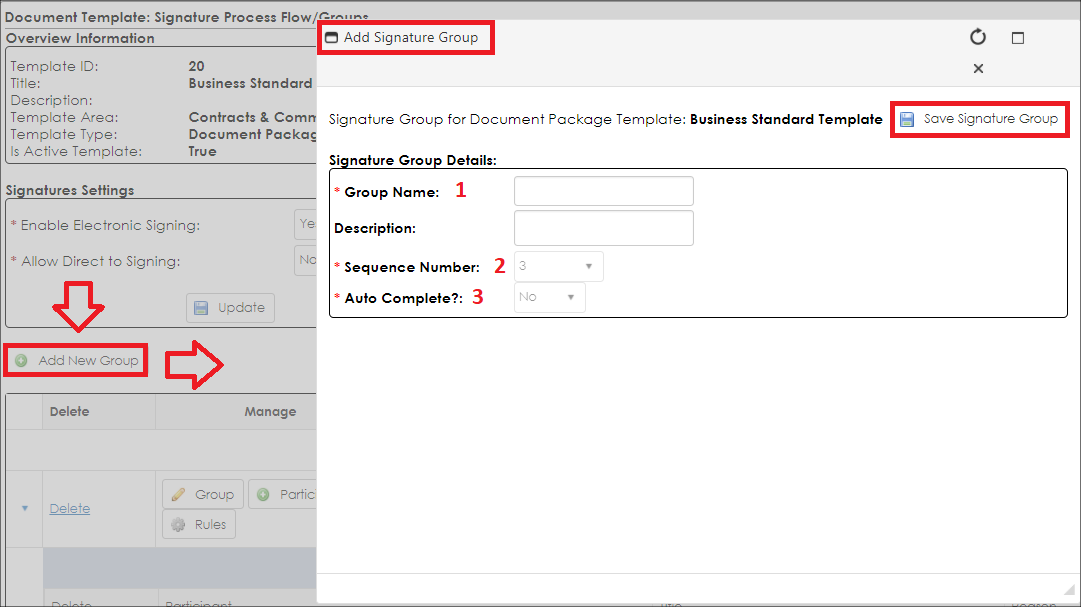
Each new group requires the Name, Sequence Number, Auto Complete? fields to be populated prior to being created.
1. Group Name: Provide the text of the name for this signature group
2. Sequence Number: This will be automatically derived on creation (placed as the last signature group in the sequence). After creation, this can be modified.
3. Auto Complete: This field is currently not used by Document Authoring.
Once all the information is provided, click Save Signature Group.
|